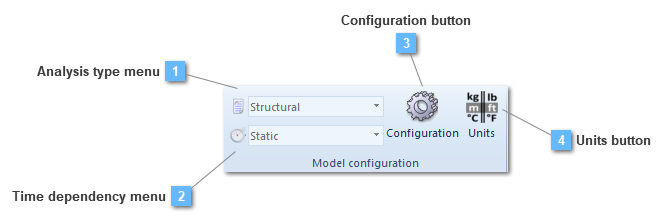
Show the analysis type in which the model will be solved. The user may change the analysis if the model is required to be solved in a different one from the structural, such us: thermal or seepage.
Determine if there is a time dependency depending on the analysis visualized on the drop. The user may change the analysis if the model is required to be solved in a different one.
The user can find some configuration controls and set different preferences for the active model.
Model Configuration panel
Precision digits
Number of significant digits for number storage and calculation. Precision digits are independent from units. Should be greater than Digits to view. Default value = 12 (maximum is 15).
Digits to view
Number of decimals for number representation. Should be lesser than Precision digits. Default value = 6 (maximum is 12).
Scale factor
Factor to scale loads and boundary condition symbols in GUI. Default value = 1.
Geometric tolerance
Tolerance for geometric operations. If a curve has a length smaller than the tolerance it will be deleted. Points will be merged together when the distance between them is shorter than the tolerance. Default value = 0.10 mm (or 0.004 in).
Mesh tolerance
Tolerance to detect nodes on geometry.
Force cut off
Nodal forces lower than the specified threshold value will be considered as zero. Default value = 0.100 N (or 0.022 lbf).
Moment cut off
Nodal moments lower than the specified threshold value will be considered as zero. Default value = 0.100 Nm (or 0.885 lbf in).
The user must use the keyboard for numerical data entry. The program interprets the data entry according to the context in which it is used. If the program expects a real number and an integer is entered, CivilFEM automatically converts the number to its floating point value. Conversely, if a floating point format number is entered where an integer is expected, the program converts the real number to an integer.
Scientific notation for real numbers is allowed in the following formats:
1.2345 .12345e01 -0.12345e-01
Analysis type
Discipline
Indicates the analysis type: structural, seepage or thermal.
Dimension
2D or 3D.
Time dependency
Static or transient.
Large displacements
Specifies that large displacements are to be taken into account in the current analysis.
The analysis is nonlinear. It signals the program to calculate the geometric stiffness matrix and the initial stress stiffness matrix.
Code check/desing
3D Strains
Number of steps for strains for concrete biaxial bending check. Default value = 30.
3D Angular
Number of steps for angles for concrete biaxial bending check. Default value = 28.
2D Steps
Number of steps for concrete axial + bending check. Default value = 100.
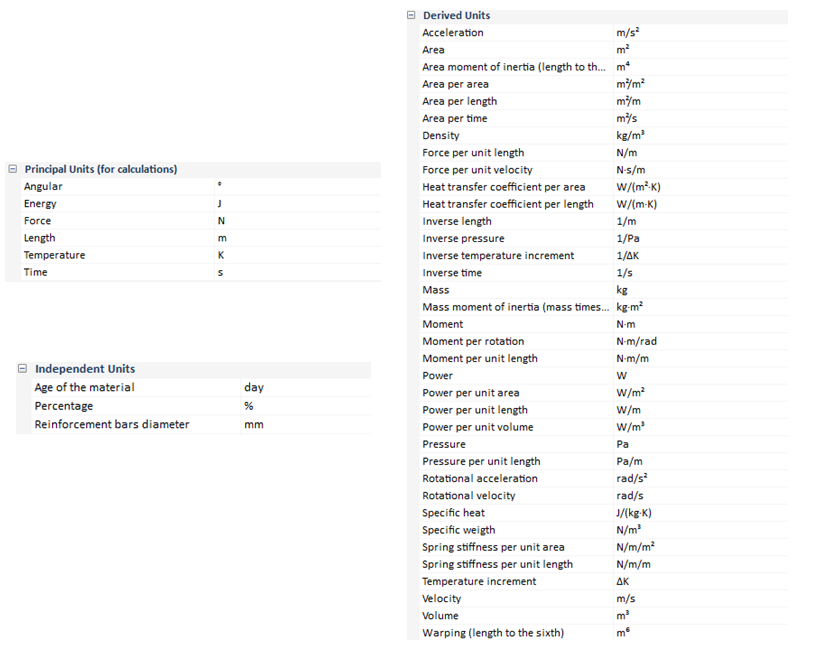
The global unit system can be modified anytime and the affected data will be updated automatically unless the user has modified a particular or several value(s) on purpose. In that case, that/those value(s) will remain unchanged. In order to modify the units, the user can select the "User Units System" option. The chart will be available for changes.
Dimensionless values are not modified by the units system.
By default, the active units system is the International System of Units (N, m, s).